Información forense
Además de los resultados (respuesta de éxito o de error), el módulo de la tecnología Deep CDR™ proporciona información forense sobre los archivos depurados, lo que permite conocer con detalle lo que ocurrió durante el proceso. Los usuarios pueden consultar tanto un resumen general como los detalles de la respuesta JSON para obtener un diagnóstico detallado.
Uso dentro del producto
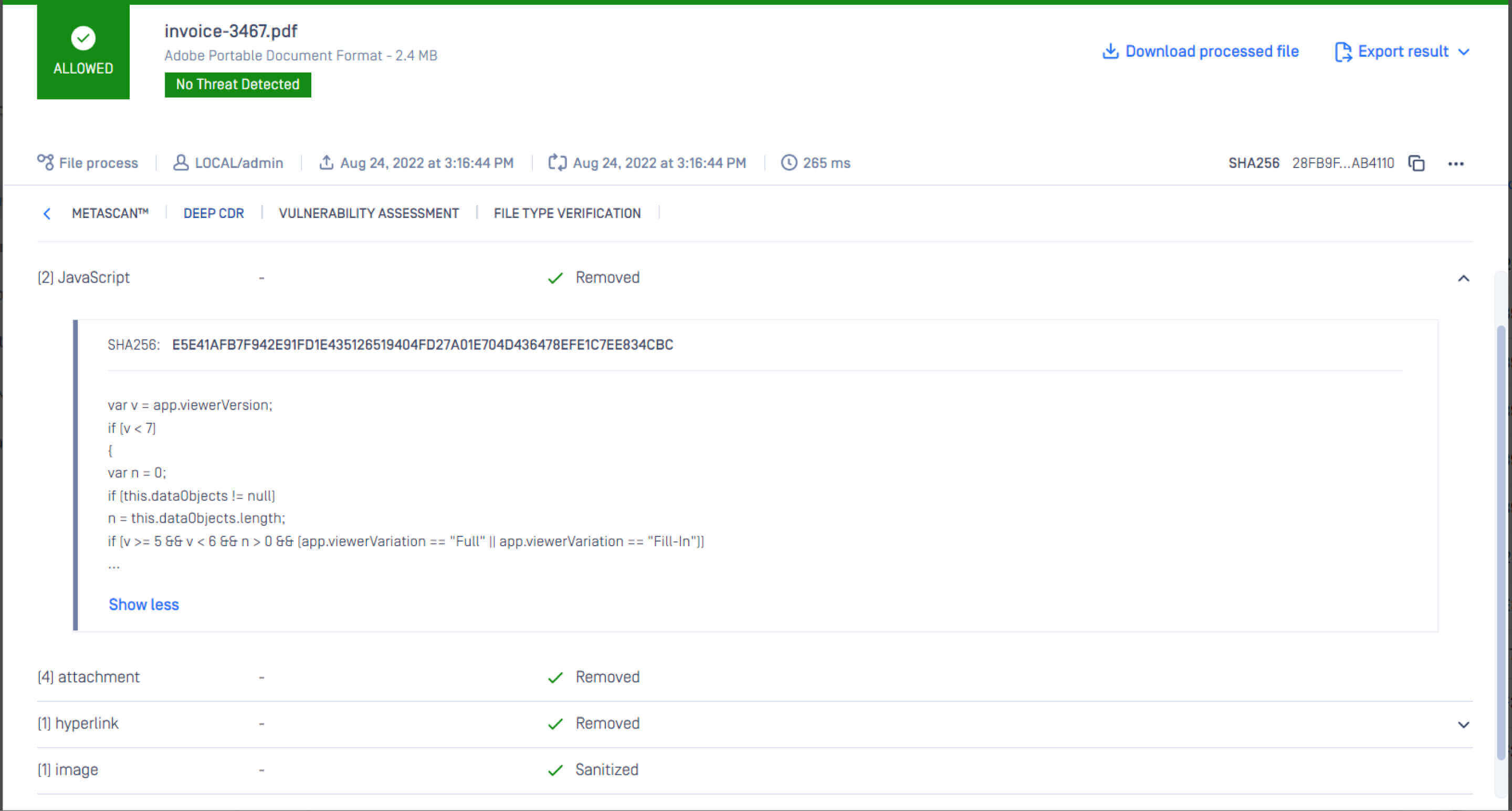
Versión preliminar de Raw Developer
{
"description": "Se ha sanitizado correctamente.",
«detalles»: [
{
"acción": "eliminado",
«count»: 1,
"detalles_del_objeto": [
"var v = app.viewerVersion;\nif (v < 7)\n{\n\tvar n = 0;\n\tif (this.dataObjects != null)\n\t\tn = this.dataObjects.length;\n\tif (v >= 5 && v < 6 && n > 0 && (app.viewerVariation == \"Full\" || app.viewerVariation == \"Fill-In\"))\n\t{\n\t\tif (this.external)\n\t\t\tapp.alert(\"This document has file attachments. To view the attachments, click the Save button to save a copy of the document, open the copy in Adobe Acrobat DC, and use the File > Document Properties > Embedded Data Objects menu.\", 3, 0);\n\t\telse\n\t\t\tapp.alert(\"This document has file attachments. Use the File > Document Properties > Embedded Data Objects menu to view the attachments.\", 3, 0);\n\t}\n\telse if (v >= 6 && v < 7)\n\t{\n\t\tif (n == 0)\n\t\t{\n\t\t\tvar np = this.numPages;\n\t\t\tsyncAnnotScan();\n\t\t\tfor (var p = 0; p < np && n == 0; ++p)\n\t\t\t{\n\t\t\t\tvar annots = this.getAnnots(p);\n\t\t\t\tif (annots != null)\n\t\t\t\t{\n\t\t\t\t\tfor (var i = 0; i < annots.length; ++i)\n\t\t\t\t\t{\n\t\t\t\t\t\tif (annots[i].type == \"FileAttachment\")\n\t\t\t\t\t\t{\n\t\t\t\t\t\t\tn = 1;\n\t\t\t\t\t\t\tbreak;\n\t\t\t\t\t\t}\n\t\t\t\t\t}\n\t\t\t\t}\n\t\t\t}\n\t\t}\n\t\tif (n > 0)\n\t\t{\n\t\t\tif (this.external)\n\t\t\t\tapp.alert(\"This document has file attachments. To view the attachments, click the black triangle at the top of the document window's vertical scrollbar and choose File Attachments.\", 3, 0);\n\t\t\telse\n\t\t\t\tapp.alert(\"This document has file attachments. Use the Document > File Attachments menu to view the attachments.\", 3, 0);\n\t\t}\n\t}\n}\n"
],
"nombre_del_objeto": "JavaScript",
"object_sha256": [
"057b01826683300e04b0f96c03ddbfde1d464028de950dece763b916d7b4a776"
]
},
{
"acción": "eliminado",
«count»: 1,
"nombre_del_objeto": "archivo adjunto"
},
{
"acción": "eliminado",
«count»: 1,
"nombre_del_objeto": "contenido externo"
},
{
"acción": "eliminado",
«cuenta»: 6,
"nombre_del_objeto": "campo del formulario"
},
{
"acción": "eliminado",
«cuenta»: 6,
"detalles_del_objeto": [
«http://google.com»,
«http://metascan-online.com»,
«metadefender»,
«http://cbs.iSkysoft.com/go.php...»,
«https://metascan-online.com»,
«http://www.google.com»
],
"nombre_del_objeto": "hipervínculo",
"object_sha256": [
"aa2239c17609b21eba034c564af878f3eec8ce83ed0f2768597d2bc2fd4e4da5",
"528629a95451ab135ab205c7c5bed34c7558c23c48b50415aa7dc1b2aa615c36",
"16ae3209dcd61a65e598eb01aad34c51eee5f5e47cc853defafcc0ce50ed16a3",
"692968d0c0f57230d64b8e9ad4511ab38840bdaf33faab64d46413cc760d899b",
"e6ffbdf06681c914b782821cd36c9162757953e9cd503748deb9fa0e8d71784a",
"253d142703041dd25197550a0fc11d6ac03befc1e64a1320009f1edf400c39ad"
]
},
{
"acción": "depurada",
«count»: 4,
"nombre_del_objeto": "imagen"
},
{
"acción": "eliminado",
«count»: 1,
"nombre_del_objeto": "acción de la página"
}
]
}
